
To change the used port range after installing Axxon Next, do as follows:
- Find the NTServiceOpts parameter in the section: HKEY_LOCAL_MACHINE\SOFTWARE\AxxonSoft\NGP.
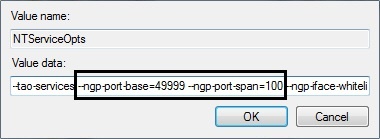
- Under this parameter, find and change the values:
- --ngp-port-base (the beginning of the port range) and
- --ngp-port-span (number of ports).
- Restart Server (see Shutting down a Server, Starting a Server).