
Page History
...
Export start
POST http://IP-Address:port/prefix/export/archive/{VIDEOSOURCEID}/{BEGINTIME}/{ENDTIME} – archive export.
POST http://IP-Address:port/prefix/export/live/{VIDEOSOURCEID}/{BEGINTIME}/{ENDTIME} – live video export.
...
| Parameter | Required | Description |
|---|---|---|
| waittimeout | No | Wait timeout in milliseconds required for a frame to arrive. The default value is 10000. If the parameter value is less than the reference frames interval, then the export will not be performed. It is recommended to set the value not less than 30000 |
| archive | No | Name of the archive in the hosts/SERVER1/MultimediaStorage.AliceBlue/MultimediaStorage format (see Get archive contents). If the value is not specified, the default archive will be used for export |
...
| Parameter | Format | Description | Example | ||
|---|---|---|---|---|---|
| format | String | Mandatory parameter. Available values are mp4, mkv, avi, exe, jpg and pdf. It sets the format of output export container | |||
maxfilesize | Number | Maximum export file size in bytes. A new file will be created when the size limit is exceeded. Export results in the collection of files. Default value is 0 (as a result, a single file) | "maxfilesize": 1e+6"maxfilesize": 1000000 | ||
| vc, ac | Number | A compression quality level for video and audio respectively. Allowed values are from 0 to 6 (6 means the worst). Default value is 0 | |||
| freq | Number | Frame rate of the output stream. Default value is 0. Available values:
| |||
| tsformat | String | A time stamp format template. Any string can be generated on the basis of http://www.boost.org/doc/libs/1_55_0/doc/html/date_time/date_time_io.html. Default value is %Y-%b-%d %H:%M:%S. Attention! The Server does not check the format of the input string | "tsformat": "%B %Y", | ||
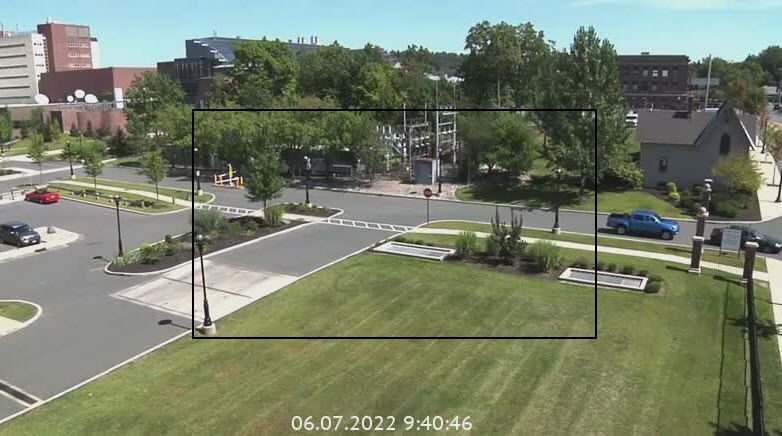
| croparea | Area | A frame area for export (default value is [[0, 0], [1,1]] – the entire frame). Image example:
|
| ||
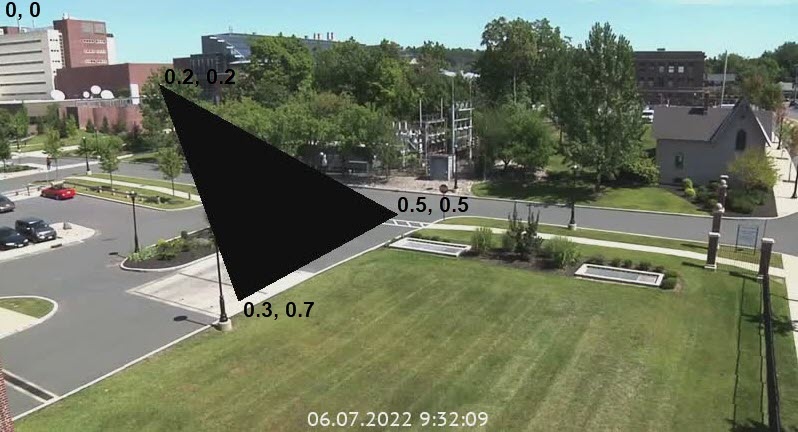
| maskspace | Area | A frame area for masking, set in coordinates. By default a frame is not masked. The area is specified by at least 3 anchor points + 1 terminal point (coincides with one of the anchor points). The reference point is the upper left corner. You can specify multiple polygons. Image example:
|
| ||
| color | String | Text color of a comment and a time stamp. It is set in the #FFFFFF web format | "color": "#e31e1e", | ||
| comment | String | A comment | |||
| Parameters relevant for PDF export only: | |||||
| snapshotplace | Area | Frame location on the page | |||
| commentplace | Area | Comment location on the page | |||
| tsplace | Area | Time stamp location on the page | |||
| layout | Number | Page layout. Available values are 0 (portrait), 1 (landscape) | |||
...
Get export status
GET http://IP-Address:port/export/{id}/status
...
Download file
GET http://IP-Address:port/prefix/export/{id}/file
| Tip |
|---|
id is the value from the Location field (here 3dc15b75-6463-4eb1-ab2d-0eb0a8f54bd3) |
| Parameter | Required | Description |
|---|---|---|
| name | Yes | Name of file from the files field |
Sample request:
GET http://127.0.0.1:80/export/3dc15b75-6463-4eb1-ab2d-0eb0a8f54bd3/file?name=Server1_DeviceIpint.10[20190903T050000-20190903T050100].mp4
...
This request deletes the created file on the Server.
DELETE http://IP-Address:port/prefix/export/{id}
...
Overview
Content Tools