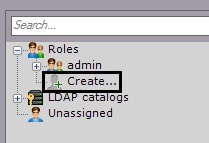
The new role is added in the system, with its properties displayed on the right side.
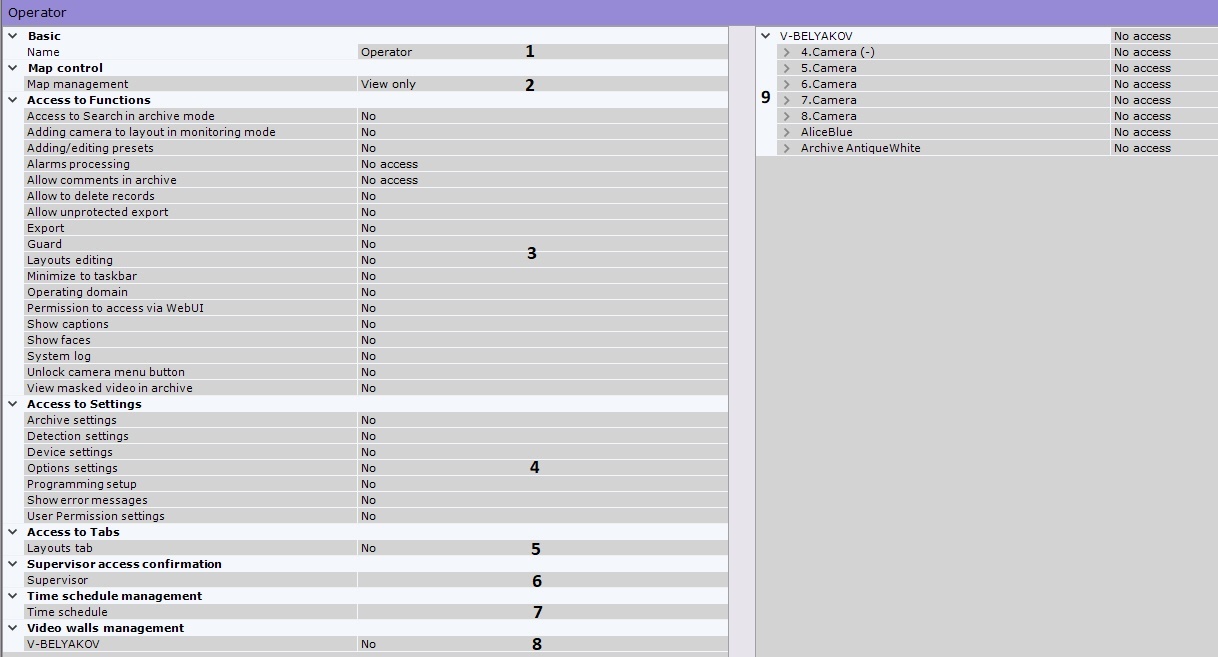
Select priority of PTZ cameras control for users with the current role (2).
Select priority of map access for users with the current role (3).
Access level | Description |
View only | You can only view maps |
View/move/scale | You can move and scale maps |
Full access | All options available |
- Adding a camera to a layout in live video mode.
- Adding and editing presets for PTZ cameras.
Context menu of a video camera in a viewing tile.
- Editing layouts.
- Archive search.
- Access to the Web server.
- Alarms Management.
User comments for recorded video.
- Minimizing the Client to the system tray.
- Viewing the system log.
- Managing an C-Werk domain.
- Exporting snapshots and video recordings.
Displaying captions.
Configure access rights to the Settings tabs and to system error messages (5).
Error messages are displayed in real time in the Layouts interface
|

Set access permissions for Layouts in C-Werk (6).
If you need to grant the users in this role permissions only for a certain period of time, select a Time schedule (7) from the list. These users will not be able to use their permissions outside of the selected time schedule.
Set permissions for access to hardware and archives on an C-Werk domain (9).
Device | Access permissions | Description |
|---|---|---|
Video camera
| No access | You cannot access the device. |
Live in Armed mode | You can view video from the camera only when the camera is armed. | |
Live | You can live video from the camera. Other functions and device configuration are not available. | |
Live/Archive | You can view live and recorded video from the camera. You cannot arm/disarm/configure the camera. | |
Live/Archive/Control | All functions available. You cannot configure the device. | |
| Live/Archive/Control/Configure | All functions and settings available. | |
Microphone
| No access | The user is unable to listen to live sound from the video camera. The user is unable to listen to sound recordings from the archive. |
Live Audio | The user is able to listen to live sound from the video camera (the microphone must be turned on). The user is unable to listen to sound recordings from the archive. | |
Live Audio and Archive | All functions are accessible | |
Telemetry
| No access | The user cannot control pan/tilt/zoom |
Control | The user can control pan/tilt/zoom | |
| Archive | No access | Access is not provided to this archive |
| Full access | Archive is available for all functions |
You can configure group rights for accessing devices and archives of a particular Server. To do so, select an access level for the Server object. Depending on the level that is chosen, particular access levels are automatically configured for the devices and archives of the relevant Server (see table).
Server access level | Device/archive | Device/archive access level |
Custom | - | Access levels for devices and archives are set manually |
No access | - | No access to devices and archives |
Live in Armed Mode | Video camera | You can view armed cameras |
Microphone | Live Audio | |
Telemetry | Control | |
Archive | Full access | |
Live | Video camera | You can view live video |
Microphone | Live Audio | |
Telemetry | Control | |
Archive | Full access | |
Live/Archive | Video camera | You can view live and recorded video |
Microphone | Live Audio and Archive | |
Telemetry | Control | |
Archive | Full access | |
Live/Archive/Control
| Video camera | All functions. Settings not available. |
Microphone | Live Audio and Archive | |
Telemetry | Control | |
Archive | Full access | |
| Live/Archive/Control/Configure | Video camera | All functions + settings available. |
| Microphone | Live Audio and Archive | |
| Telemetry | Control | |
| Archive | Full access |
Click the Apply button to save the role.