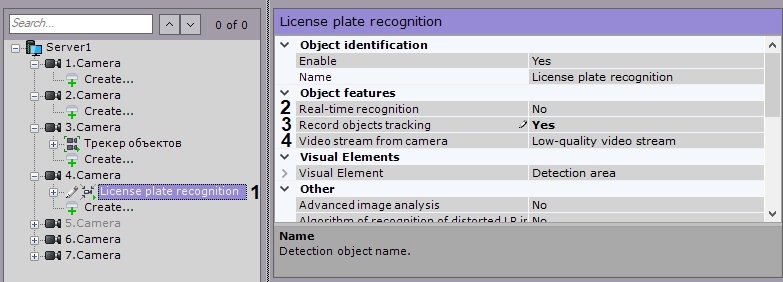
If necessary, enable advanced image analysis (1).
Yes – improves the quality of recognition under adverse conditions (for example, if the characteristics / settings of the camera do not fully meet the requirements, or in bad weather). The processing time of the frame increases by 20-30%, depending on its size. Under normal conditions, this setting does not affect the quality of recognition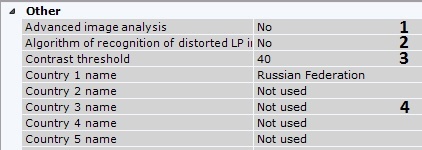
Set the image contrast threshold (3). The default value is 40 . On a high-quality image, increase this value to 50-60. If the image has poor contrast, lower this value.
In the appropriate fields, select one or more countries for ANPR (4).
The more countries you select, the slower the recognition and the greater the likelihood of the recognition error. |
By default, the frame is compressed to 1920 pixels on the longer side. To avoid detection errors on streams with a higher resolution, it is recommended that compression be reduced (1).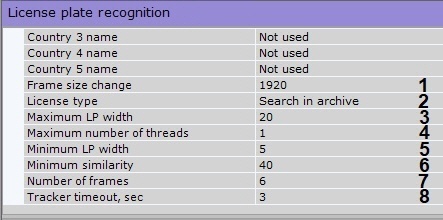
Specify the maximum number of recognition threads (3). If the value is 0, the recognition process will occur in the same thread that starts it.
It is not recommended to specify a value that exceeds the number of CPU cores. |
Specify the minimum percentage of similarity between the recognition result and the corresponding number plate template, for positive LPR result (5). Use this parameter to filter the results by reliability.
Set the number of frames required for LPR / ANPR (6). This is though a necessary condition, but not sufficient for the first output. This condition delays LPR output. This parameter allows to increase the reliability of the results, as well as to hide false positives.
In the Tracker timeout field, enter a time period in seconds. This is the time before detection starts again after a number plate is recognized (7).
You can configure an ANPR zone in FoV. The zone is resized by moving the anchor points.
For your convenience, you can click the |
 button and configure the mask on a still frame / snapshot. To undo, click this button again.
Detection zone is displayed by default. You can click the |
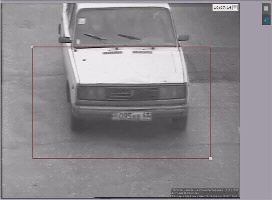 button to hide the zone. To undo, click this button again.